Build Your First RAG Chatbot
Chat with any PDF, built from scratch so you understand every part, not just run it.

RAG is the most common line on data resumes right now, and the least understood. I have watched people who list it go quiet when asked what actually happens between the question and the answer.
I build these systems for a living, and the version that survives contact with real questions is not the one in most tutorials. Those are framework quickstarts that work in the demo and fall apart the moment someone asks something slightly off. So today we build a document chatbot from scratch. Small enough to read every line, honest about where it breaks, and finished with a fix that almost every beginner tutorial skips.
What RAG actually is, in one plain idea
A language model on its own does not know what is inside your PDFs. Ask it about a document it has never seen and it will make something up that sounds right. RAG (retrieval augmented generation) fixes that with a boring, powerful trick: before the model answers, you search your documents, pull the few passages that matter, and hand them to the model along with the question. The model answers from what you gave it, not from memory.
That is the whole idea. Search, then generate. Everything below is just doing those two things well.
The four moving parts
Every RAG system, including the ones running in production, is these four steps. Hold this map and nothing later will feel like magic.
Chunk. Break each document into small passages.
Embed. Turn each passage into a list of numbers that captures its meaning.
Retrieve. When a question comes in, find the passages whose numbers are closest to the question’s.
Generate. Give those passages and the question to Claude, and let it write the answer.
We build them one at a time. It runs on a laptop, no framework and no server, just a local vector store you install with pip.
The corpus
Point this at any PDFs you like. For something concrete, grab a few public research papers, or a company’s 10-K filing if you want the finance-analyst version. A long filing is a good stress test, because no model can hold a 100-page document in one prompt, which is exactly the problem retrieval solves.
Drop three or four PDFs in a folder called docs/. That is your knowledge base.
pip install pypdf chromadb anthropic streamlit
Step 1 — Read the PDFs, and meet the trap
Every real data source has a quality trap, and PDFs are full of them. Text extraction gives you broken lines, headers and footers repeated on every page, and tables mashed into gibberish. Skip this and your chatbot quietly answers from garbage.
from pypdf import PdfReader
import glob

def load_docs(folder="docs"):
    docs = []
    for path in glob.glob(f"{folder}/*.pdf"):
        reader = PdfReader(path)
        text = "\n".join(page.extract_text() or "" for page in reader.pages)
        text = " ".join(text.split())          # collapse the broken whitespace
        if len(text) > 200:                     # skip empty or scanned pages
            docs.append({"source": path, "text": text})
    return docs

docs = load_docs()
print(f"Loaded {len(docs)} documents")
Always read a chunk of the raw output before trusting it. If a PDF is scanned images, extract_text returns nothing and you would need OCR, which is a good thing to catch now rather than after building the whole pipeline.
AI move: paste a messy extracted page and ask your assistant to write the cleanup rules. Text janitoring is exactly the tedious work it is good at.
Step 2 — Chunk it, and respect the trade-off
You cannot embed a whole document as one blob, because retrieval would return the entire thing and drown the model. So you split it into passages. Chunk too big and you dilute the meaning. Chunk too small and you cut ideas in half. A few hundred words with a little overlap is a safe start, and the overlap keeps sentences from being sliced at the boundary.
def chunk_text(text, size=220, overlap=40):
    words = text.split()
    chunks, i = [], 0
    while i < len(words):
        chunks.append(" ".join(words[i:i + size]))
        i += size - overlap
    return chunks

passages = []
for d in docs:
    for c in chunk_text(d["text"]):
        passages.append({"source": d["source"], "text": c})

print(f"{len(passages)} passages ready")
Chunking is where most first RAG systems quietly fail. Keep it in mind, because we come back to it when we break the thing on purpose.
Step 3 — Embed and store the passages
An embedding is a list of numbers that captures the meaning of a passage. A model reads the text and places it as a point in space, where passages about similar things land near each other. We hand our passages to Chroma, a local vector store that embeds them, saves them to disk, and searches them for us.
import chromadb

db = chromadb.PersistentClient(path="chroma_db")          # saved to disk, survives restarts
col = db.get_or_create_collection(
    "docs",
    configuration={"hnsw": {"space": "cosine"}},          # cosine is the right metric for text
)

if col.count() == 0:                                       # only embed on the first run
    col.add(
        ids=[f"{p['source']}-{i}" for i, p in enumerate(passages)],
        documents=[p["text"] for p in passages],
        metadatas=[{"source": p["source"]} for p in passages],
    )
By default Chroma embeds with a small local model called all-MiniLM, so the first run downloads it once and then works offline. The count() == 0 check means you embed once and reuse the saved index every run after.
How embeddings actually work, in the part that matters
You do not need the math, but a few ideas will save you real debugging time later.
An embedding model turns text into a fixed-length list of numbers called a vector. That length is the model’s dimensions. all-MiniLM gives 384 numbers per passage, larger models give 768 or 1536. More dimensions can hold more nuance, but the number itself is not quality. A good small model beats a mediocre large one.
Three choices decide how well retrieval works:
The model. Local models like all-MiniLM (fast, free, private) or the stronger
bgefamily run on your machine. Hosted models from OpenAI, Voyage, and Cohere retrieve better and cost money, and they send your text to a provider. Start local, upgrade when retrieval quality is what actually holds you back.Max input length. Every model has a token limit, often 256 to 512 for the small ones. Feed it a chunk longer than that and the tail is silently cut off, so the embedding misses half the passage. This is why your chunk size and your embedding model have to agree.
The distance metric. This is how “close” gets measured. Cosine compares direction and is the right default for text, which is why we set it above. The others you will run into are L2 (straight-line distance) and inner product.
The one rule underneath all of it: embed your documents and your questions with the same model. Mix two and the numbers live in different spaces, and retrieval comes back as noise.
Step 4 — Retrieve
Retrieval is now one call. Chroma embeds the question with the same model, compares it to every stored passage, and hands back the closest few.
def retrieve(question, k=4):
    r = col.query(query_texts=[question], n_results=k)
    return [{"source": m["source"], "text": t}
            for t, m in zip(r["documents"][0], r["metadatas"][0])]
Under the hood this is comparing vectors by cosine similarity, the same idea whether you run it in ten lines of numpy or a store built for billions of vectors. Chroma just does it fast, keeps it on disk, and lets you filter by metadata, which is how you would later scope a search to one document.
Step 5 — Generate a grounded answer
Now we hand the retrieved passages and the question to Claude, with strict instructions to answer only from what we gave it. That instruction is what stops it from making things up.
import anthropic

client = anthropic.Anthropic()   # reads ANTHROPIC_API_KEY from your environment

SYSTEM = ("Answer using only the provided context. "
          "If the answer is not in the context, say you don't know. "
          "Quote the wording from the source where you can.")

def answer(question):
    hits = retrieve(question)
    context = "\n\n".join(f"[{h['source']}]\n{h['text']}" for h in hits)
    msg = client.messages.create(
        model="claude-sonnet-5",               # claude-haiku-4-5 is cheaper and nearly as good here
        max_tokens=1024,
        system=SYSTEM,
        messages=[{"role": "user", "content": f"Context:\n{context}\n\nQuestion: {question}"}],
    )
    return msg.content[0].text, hits

reply, sources = answer("What problem does this paper solve?")
print(reply)
The “say you don’t know” rule matters more than it looks. A chatbot that admits a gap is useful. One that confidently invents an answer from nothing is a liability.
Step 6 — Give it a chat window
Same shipping muscle as any project: wrap it so a human can use it. Streamlit turns the function above into a real chat in about fifteen lines.
# app.py  ->  streamlit run app.py
import streamlit as st

st.title("Chat with your documents")

if "history" not in st.session_state:
    st.session_state.history = []

for turn in st.session_state.history:
    with st.chat_message(turn["role"]):
        st.markdown(turn["content"])

if question := st.chat_input("Ask about the documents"):
    st.session_state.history.append({"role": "user", "content": question})
    with st.chat_message("user"):
        st.markdown(question)
    reply, sources = answer(question)
    with st.chat_message("assistant"):
        st.markdown(reply)
        with st.expander("Sources used"):
            for s in sources:
                st.caption(f"{s['source']}: {s['text'][:200]}...")
    st.session_state.history.append({"role": "assistant", "content": reply})
That sources expander is not decoration. It is the single most useful habit in RAG, and we lean on it in a minute.
Step 7 — Give it a memory
Right now every question starts cold. Ask “what problem does it solve?” and then “what are its limitations?” and the bot has no idea what “its” refers to, because each call only sees the current question. Real chat needs two kinds of memory: the model should see the conversation so far, and retrieval should read a follow-up as a full question.
The move that makes this work is to rewrite the follow-up into a standalone query before you search. “What are its limitations?” becomes “What are the limitations of the retrieval method in this paper?” so the search actually finds something.
def condense(question, history):
    if not history:
        return question
    convo = "\n".join(f"{t['role']}: {t['content']}" for t in history[-6:])
    msg = client.messages.create(
        model="claude-haiku-4-5", max_tokens=120,        # a cheap model is fine for this
        messages=[{"role": "user", "content":
            f"Conversation so far:\n{convo}\n\n"
            f"Rewrite the user's new message as a standalone search query.\n"
            f"New message: {question}\nStandalone query:"}])
    return msg.content[0].text.strip()

def answer(question, history):
    search_query = condense(question, history)           # follow-ups become searchable
    hits = retrieve(search_query)
    context = "\n\n".join(f"[{h['source']}]\n{h['text']}" for h in hits)
    messages = history[-6:] + [{"role": "user",
        "content": f"Context:\n{context}\n\nQuestion: {question}"}]
    msg = client.messages.create(model="claude-sonnet-5", max_tokens=1024,
                                 system=SYSTEM, messages=messages)
    return msg.content[0].text, hits
Then change one line in app.py to pass the running conversation:
reply, sources = answer(question, st.session_state.history)
Memory has a cost. The conversation grows, and every turn you send it back the token bill climbs. So cap it, which is what history[-6:] does, and once chats get long, summarize the older turns into a sentence instead of shipping them whole.
Now break it on purpose
A demo that answers one easy question proves nothing. So ask it something it should know but phrases differently from the document, and watch it stumble. When it does, open the sources panel and look at what it actually retrieved. Nine times out of ten the answer was missing because retrieval pulled the wrong passages, not because the model failed.
Three fixes, in the order I reach for them:
The chunk was too big or too small. Re-chunk and see if the right passage starts showing up. This is the most common culprit.
You needed more passages. Bump
kfrom 4 to 6 or 8 so the right one makes the cut.The question and the document use different words. This is where you would later add a reranker or hybrid keyword search.
To make this measurable instead of a vibe, write down five questions and the source that should answer each. After a change, check how often the right source lands in your top k. That number, retrieval hit rate, is the honest health check for any RAG system, and it is the thing you show in an interview.
AI move: have your assistant draft those five test questions from a document. Let it build the eval, but you judge whether the retrieved passages are actually right. It cannot see when retrieval quietly failed.
Modularize it
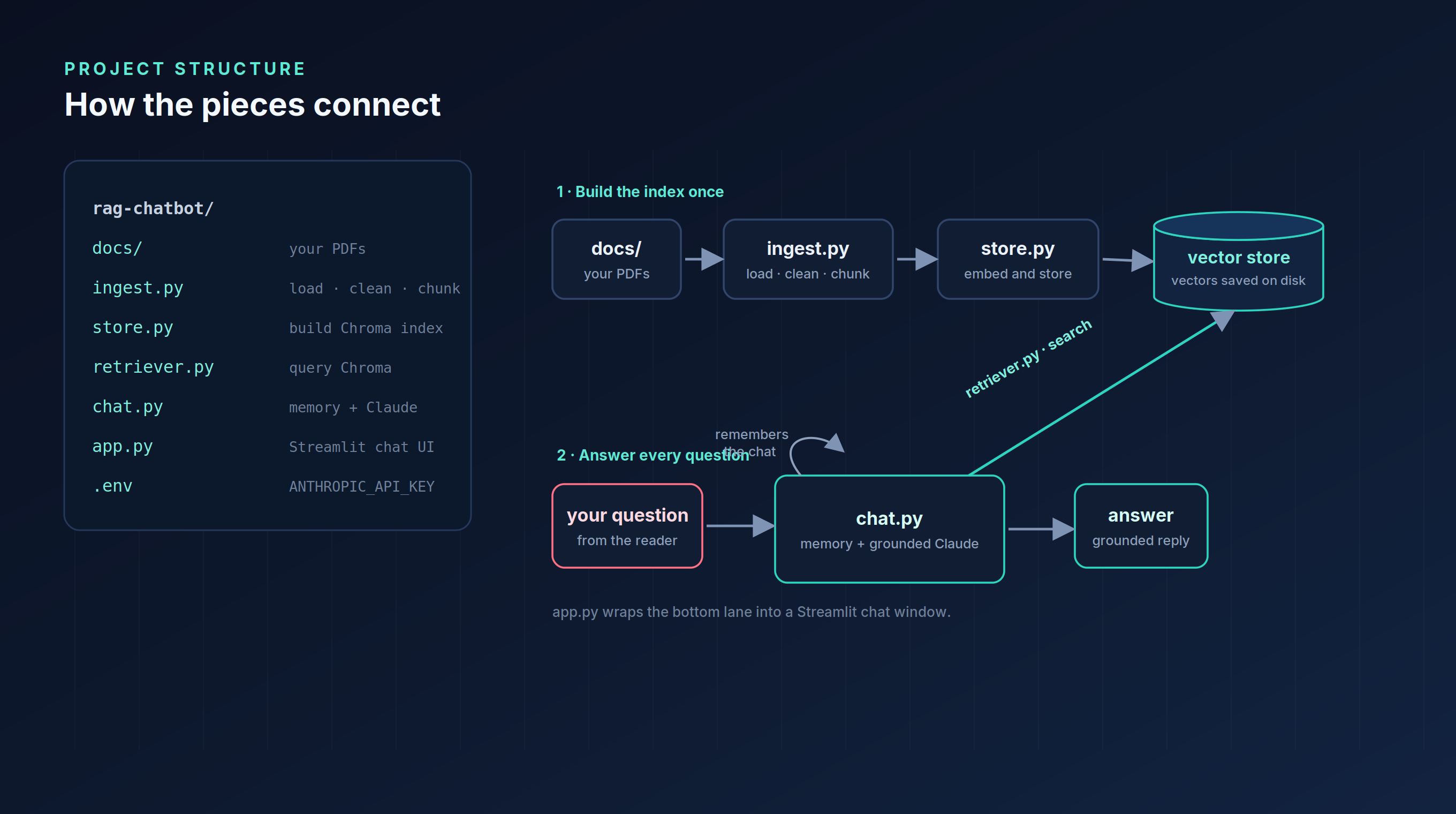
Everything so far fits in one script, which is fine while you learn. To make it something you can maintain and put on GitHub, split it by job. Each file does one thing and can be tested on its own.
rag-chatbot/
  docs/          your PDFs go here
  ingest.py      load, clean, and chunk the PDFs
  store.py       build the Chroma collection from the chunks
  retriever.py   query Chroma for the closest passages
  chat.py        memory, retrieval, and the grounded Claude call
  app.py         the Streamlit chat interface
  .env           ANTHROPIC_API_KEY
The win is not tidiness. The chunking logic lives in exactly one place, so when you tune it there is one file to change. You can swap the vector store inside store.py and retriever.py without touching the chat, and you can test retrieval on its own before wiring up the model. The diagram below shows how the pieces connect and where your question flows.
AI move: hand your single script to an assistant and ask it to split it into these files. Mechanical refactors like this are where it saves the most time.
Know your options
You built the simplest version of every part. Here is the map of what you would reach for next, so you recognize the words when you need them. This is a tour, not a syllabus.
Where to keep the vectors:
numpy from scratch: no dependencies, and the clearest way to see the mechanic, since retrieval is one line of cosine similarity. No persistence and no filtering, so it is a teaching tool more than a real store.
Chroma (what we used): saves to disk, metadata filtering, one pip install, runs on your laptop. The right default for a real project.
pgvector (Postgres): keep vectors next to your real data with SQL filtering and one database to run. Great if you already use Postgres.
Hosted (Pinecone, Qdrant, Weaviate): scale to millions of vectors with metadata filters and low latency, at the cost of another service and a bill.
Rule of thumb: Chroma for most real projects, pgvector when you already live in Postgres, a hosted store once you cross millions of vectors or need speed at scale. At that size exact search gets slow, so these stores use approximate indexes (the names you will see are HNSW and IVF) and split the data across machines. You do not need that early. You just need to know it exists.
How to chunk:
Fixed size with overlap (what we used): simplest, and it works better than it has any right to.
Structure-aware (split on headings and paragraphs): keeps whole ideas together. Better for papers and filings.
Semantic (split where the meaning shifts): the best retrieval quality, at more compute.
Rule of thumb: start with fixed size and overlap, then move to structure-aware when your documents have clear sections. Chunking is the highest-leverage knob you own, so it is the first thing to change when retrieval disappoints.
When RAG is the wrong tool: if the answer needs the whole document at once, or live math, retrieval is not the right shape. Reach for long context or a different approach instead.
Take it to production
A few moves turn the demo into something that runs every day:
Persist the index. The
count() == 0check already handles this: embed once, reuse the saved Chroma store, and never re-embed on every run. Re-embedding each time is the most common beginner waste.Add a reranker. Retrieve 20 passages cheaply, then let a small reranker reorder them so the best few reach the model. This is the biggest quality jump after chunking.
Evaluate every change. Grow your five test questions into a set, track retrieval hit rate, and run it before you ship anything. No eval means you are guessing.
Log and watch. Save each question with the passages it retrieved. When an answer is wrong, the log tells you whether retrieval or the model failed.
Deploy it. The Streamlit app runs on Streamlit Community Cloud or in a small container. Keep your key on the server, never in the browser.
Where an assistant helps most is the plumbing: scaffolding the modules, writing the reranker call, generating eval cases. Where it does not help is judging whether retrieval is good on your documents. That call needs you reading the sources panel, because the model has no idea when it was handed the wrong pages.
Turn it into a portfolio project
Overview — a chatbot that answers questions about a set of PDFs by retrieving the relevant passages first, so answers stay grounded in the source.
Approach — extracted and cleaned PDF text, chunked with overlap, embedded and stored the chunks in Chroma with cosine similarity, chose the embedding model on purpose, generated grounded answers with Claude, added conversation memory with follow-up query rewriting, wrapped it in a Streamlit chat with visible sources, split the code into clean modules, and measured retrieval hit rate on a small test set.
Findings — the working demo, the retrieval hit rate you measured, and the one chunking change that improved it. Fill in your numbers.
Limitations — local embeddings are modest, a single-machine Chroma store tops out in the low millions of passages, and there is no reranking yet.
The thing that makes this stand out is not that it works. It is that you can open the hood, point at each part, and say what breaks it and how you would fix it. That is the difference between listing RAG and understanding it.
Best of luck for everything!
- Sai Bysani, a fellow Hustler!
Keep grinding, keep growing,
The Data Hustle.